
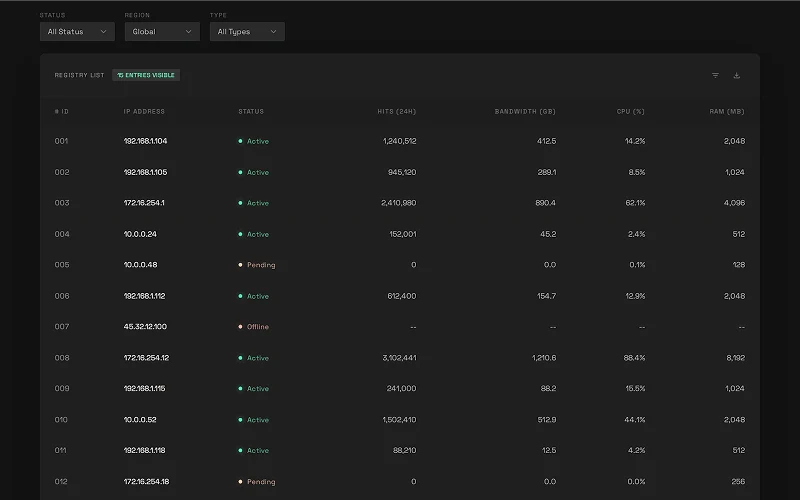
The Problem
Rendering large lists is one of the most common performance traps in React. The naive approach — mapping over an array and rendering every item — works fine at a hundred rows. At ten thousand it starts to stutter. At a million, the browser freezes or crashes entirely.
The DOM cannot hold a million nodes. Each one consumes memory, triggers layout recalculations, and adds to the garbage collector’s workload. A list of one million 50px rows would need 50,000,000px of total height — and every row would be in the DOM whether you could see it or not.
Without virtualization: ~4–6 GB of memory, 1–5 FPS scroll, and a browser that gives up before the page finishes loading. With virtualization: ~50–100 MB, 60 FPS, and a page that loads in under 100ms.
The Solution
Windowing — only render what the user can actually see.
react-window implements this by maintaining a small pool of DOM nodes equal to the viewport capacity plus a configurable overscan buffer. As the user scrolls, nodes are repositioned and their content swapped out rather than new nodes being added to the DOM.
Total Dataset (1,000,000 rows)

  ┌─────────────────────────┐
  │  Viewport (550px tall)  │  ← ~11 visible rows (550 / 50px)
  │  • Row 10,001           │    + 5 buffer rows above
  │  • Row 10,002           │    + 5 buffer rows below
  │  • ...                  │    = ~21 DOM nodes total
  └─────────────────────────┘

  [Remaining 999,979 rows: not in DOM]
Combined with lazy loading in 1,000-row chunks, the app never holds the full dataset in memory — it fetches the next chunk when the user scrolls past 80% of the currently loaded content.
Traditional vs Virtualized
// ❌ Traditional — renders every row
const TraditionalList = ({ data }) => (
  <div>
    {data.map((item) => (
      <div key={item.id}>{item.content}</div>
    ))}
  </div>
);
// Result: 1M DOM nodes → browser crash

// ✅ Virtualized — renders only what's visible
import { FixedSizeList } from "react-window";

const VirtualizedList = ({ data }) => {
  const Row = ({ index, style }) => (
    <div style={style}>{data[index].content}</div>
  );

  return (
    <FixedSizeList
      height={550}
      itemCount={data.length}
      itemSize={50}
      width="100%"
      overscanCount={5}
    >
      {Row}
    </FixedSizeList>
  );
};
// Result: ~21 DOM nodes → 60 FPS
Performance Comparison
| Metric | Traditional | Virtualized |
|---|---|---|
| DOM nodes | 1,000,000 | ~21 |
| Memory usage | ~4–6 GB | ~50–100 MB |
| Initial load | 30–60 sec | ~100 ms |
| Data loading | All at once | 1,000-row chunks |
| Scroll FPS | 1–5 | 60 |
How the Chunking Works
Data is fetched from Supabase in 1,000-row pages. The app tracks scroll position and triggers the next fetch when the user reaches 80% of the currently loaded content:
const CHUNK_SIZE = 1000;
const ROW_HEIGHT = 50;
const VIEWPORT_HEIGHT = 550;

const scrollPercentage =
  scrollOffset / (itemCount * ROW_HEIGHT - VIEWPORT_HEIGHT);

if (scrollPercentage > 0.8 && hasMore && !isLoadingMore) {
  loadNextChunk();
}
A singleton request manager prevents duplicate in-flight fetches when scroll events fire rapidly, and a 5-minute TTL cache avoids re-fetching chunks the user has already scrolled past.
Tech Stack
| Layer | Tech |
|---|---|
| Framework | Next.js 15 (App Router), TypeScript |
| Virtualization | react-window (FixedSizeList) |
| Styling | Tailwind CSS |
| Database | PostgreSQL via Supabase |
| ORM | Prisma |
Key Decisions
Why react-window instead of react-virtual or a custom implementation? react-window is smaller, well-maintained, and purpose-built for fixed-size rows — which is exactly this use case. Variable-height virtualization adds complexity that isn’t needed here, and a custom implementation would just be reimplementing what react-window already does correctly.
Why chunk at 1,000 rows instead of fetching all data upfront? Even if the browser could hold the data in JS memory, fetching one million rows in a single request would be slow and fragile. Chunking keeps the initial load fast and lets the app stay responsive while more data arrives in the background.
Why a singleton request manager? Scroll events fire many times per second. Without deduplication, a fast scroll would fire dozens of overlapping requests for the same chunk. The singleton ensures each chunk is fetched exactly once regardless of how many scroll events occur while the request is in flight.
Outcome
The app scrolls through one million rows at 60 FPS on a mid-range machine. The techniques demonstrated here — windowing, chunked lazy loading, request deduplication, and row memoization — are the same patterns used in production data-heavy applications like spreadsheets, dashboards, and log viewers.